15 PhantomBuster Alternatives | LinkedIn Tested & Ranked
We tested 15 PhantomBuster alternatives for LinkedIn automation and found the best ones. Compare features, pricing, and performance to find your perfect tool.

PhantomBuster is a popular tool for automating data extraction and outreach tasks on platforms such as LinkedIn, Twitter, and others.
However, although the platform is good and has phantoms for almost every use case, PhantomBuster can sometimes feel complicated and even dangerous, especially when it comes to LinkedIn account safety.
For example, if your primary use case for PhantomBuster is to generate leads on LinkedIn (by scraping posts, followers, groups, events, etc.) you need to be aware of the potential risks.
We did the heavy lifting for you and found better ways to automate LinkedIn lead generation, which provides higher-quality and more relevant leads without compromising the safety of your LinkedIn account.
For example, this is where alternatives like Trigify come into play. They offer real-time, signal-based lead generation that prioritizes the safety of your LinkedIn account while providing you with high-quality leads.
We tried and tested 15 different PhantomBuster competitors and compared them on multiple levels, including user experience, pricing, and usability.
We ended up with four of the best PhantomBuster alternatives for different use cases.
In this article, we'll compare these four PhantomBuster alternatives and show you the best tools to use if you want to move away from PhantomBuster and generate better-quality leads.
Let's get started.
What's Wrong with PhantomBuster?
After five years of extensive use, discussions with other PhantomBuster users, and reviews on Capterra and G2, here are the most significant issues we identified with PhantomBuster:
Complexity in Combining APIs - Integrating multiple Phantoms for complex workflows is challenging, leading to a steep learning curve. If you need more robust workflows, you’ll spend much time learning how to combine multiple Phantoms.
Data is not great - The data you extract is not always accurate, which can impact the effectiveness of your campaigns. For example, building your outreach campaigns on top of inaccurate data might get you banned on LinkedIn or your domain flagged as spam.
Slow customer support - The customer support team can sometimes respond slowly.
No real-time data - This is not the problem with PhantomBuster specifically, but rather a problem with the overall approach. By scraping platforms, you don’t get real-time data (unless you scrape data daily, but that would require massive and complicated data management from your side). On the other hand, you can get more leads and results with PhantomBuster alternatives that provide you with real-time data.
PhantomBuster serves its’ purpose as an entry level product, however, if you’re looking to close more B2B deals there are far better alternatives out there.
Let’s explore them.
Trigify - Best PhantomBuster Alternative To Find Leads Who Are Already Interested in Buying
Yes, we know that Trigify is our own product (sorry for the shameless self-promotion!). Our goal is to assist you in finding the best product for your specific use case. To do this we have objectively compared our service with PhantomBuster and other alternatives to help you decide which tool is the best fit.
Trigify identifies prospect intent by scanning social media and uncovering the topics that matter to an individual based on the content they engage with. By doing so, you are able to find relevant leads that could be interested in you, your company and the product or service you sell.
The best example of Trigify’s effectiveness in discovering new leads is shown through our own outbound campaigns.
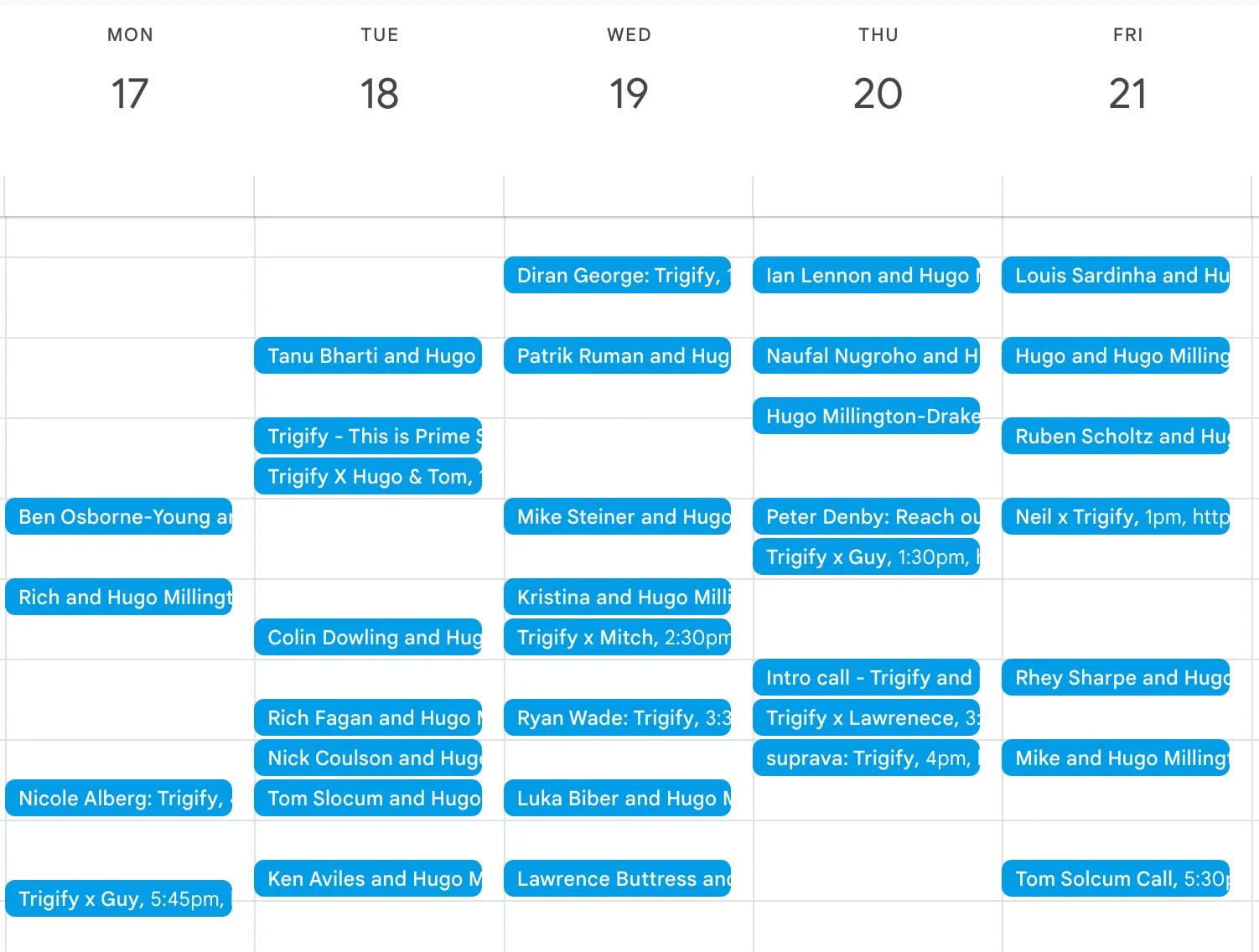
We personally use Trigify to identify high-quality leads. Our outreach campaigns, on average, get a 20-30% response rate, and we book around 150+ demo calls a month.

Here are the best ways to use Trigify as your PhantomBuster alternative to get better leads and take your outreach efforts to the next level.
3 Best Ways To Use Trigify To Get More B2B Leads
Let’s quickly explore multiple ways to use Trigify to get more B2B leads.
Acquiring competitors’ customers
You can use Trigify to quickly identify people interacting on LinkedIn with competitors’ content.
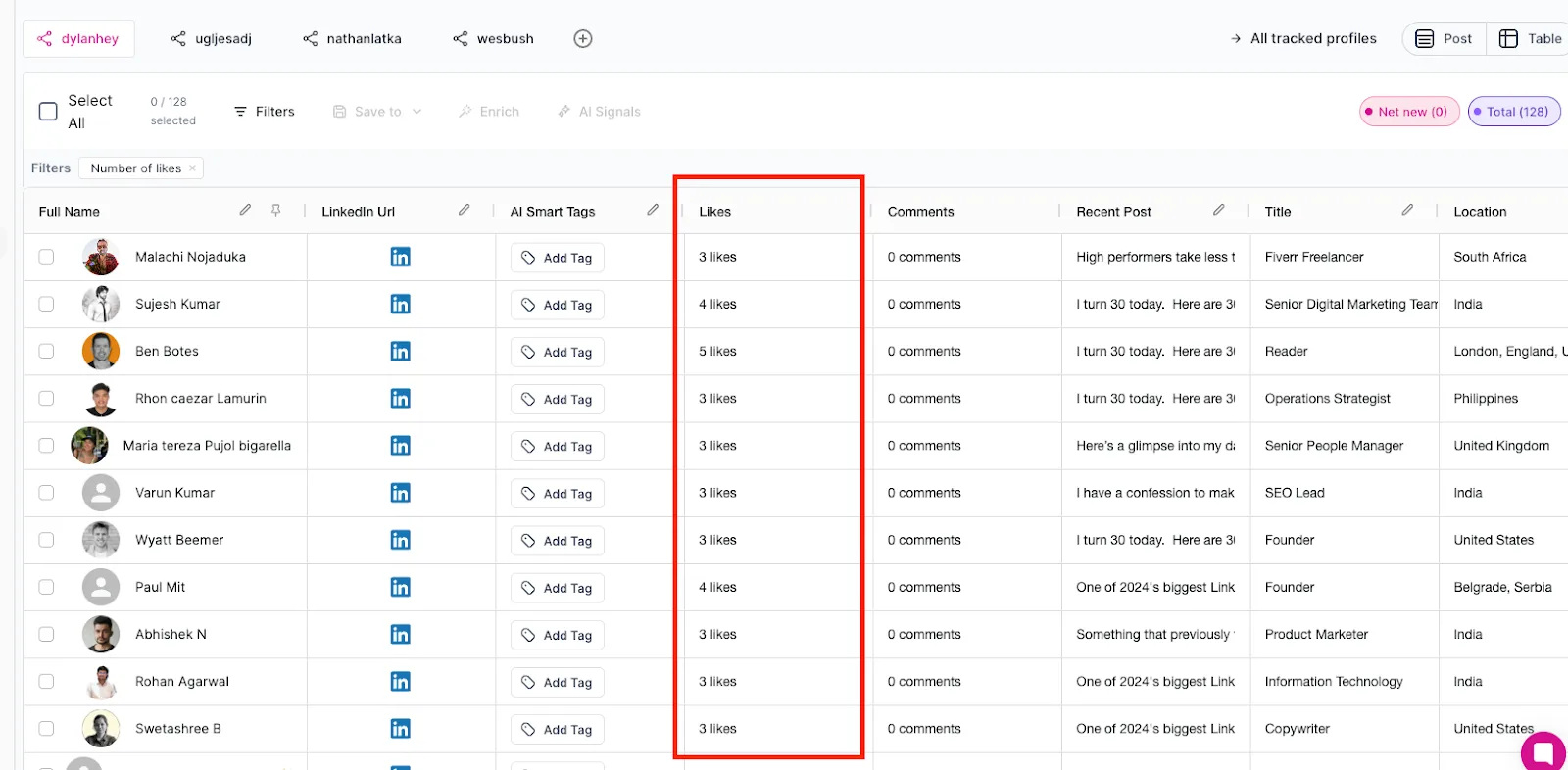
For example, with a quick search, I identified 130+ people who engaged more than 3 times with one of my competitors in the past 30 days.
This means that they are highly engaged with their content and might be interested in my offer & content as well:
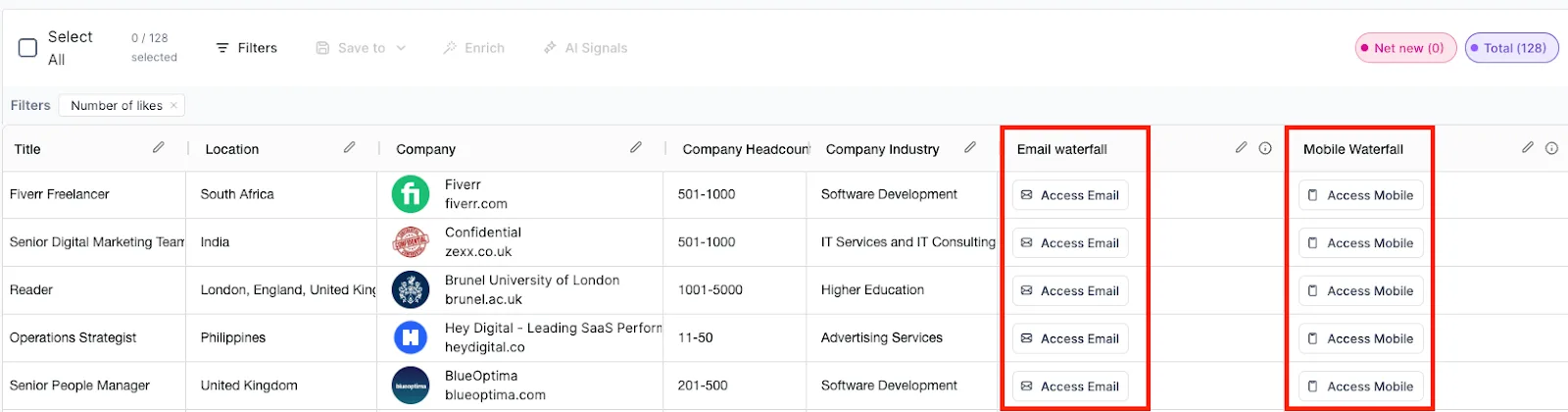
The best part is that once I find a relevant lead among those 130+ people, I can get access to their email straight from the Trigify:
Monitoring Thought Leaders and Influencers (And Stealing Their Audience)
Popular content creators in your space are a great source of potential leads.
You can use Trigify to monitor Thought Leaders for two main reasons:
- Get a glimpse of what content engages with your audience so you can reverse-engineer it.
- To find your ideal customers and reach out to them.
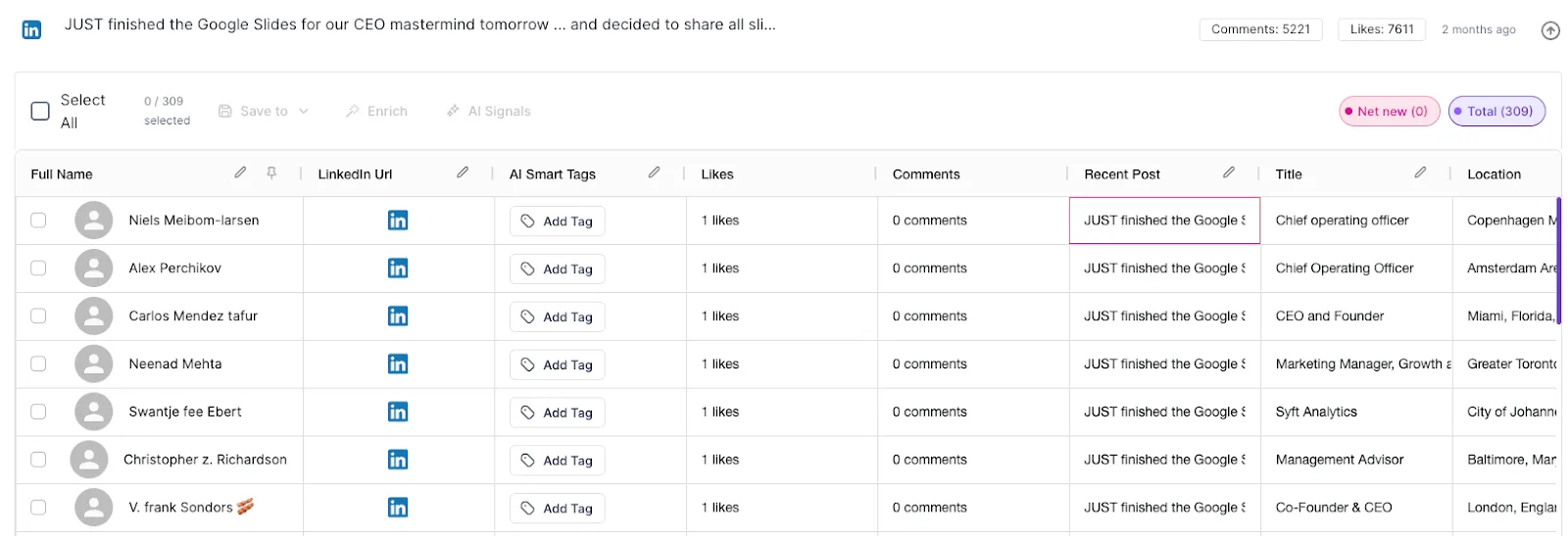
For example, I can see that Nathan Latka (one of the influencers in my space) created a lead magnet on the three best SaaS GTM frameworks in 2025.
A quick search in Trigify gives me a list of all 300+ unique people who engaged with this post (without actually scraping LinkedIn and damaging my account).
I can now export these leads, put them in an outreach tool, and send them my lead magnet on the same topic - and use that as an excuse to start building relationships with them (and eventually sign deals with them). 😉
Reaching out to people who engaged with topics of interest
You can run a global LinkedIn search and find out all the people who recently engaged with the topics you’re interested in.
For example, if my ideal customers are people who use ChatGPT, I can find posts that talk about it and reach out to people who engage with those posts.
Other Use Cases
Besides the ones we mentioned, you can also use Trigify to:
- Identify new thought leaders and influencers in your niche
- Find leads who are currently hiring for specific jobs
- Monitor mentions of specific topics or keywords on LinkedIn 24/7
You can test these use cases with Trigify’s free trial if you need them.
Trigify Disadvantages over PhantomBuster
- Right now it’s only focused on LinkedIn - the product is primarily centered around LinkedIn signals and data. It doesn’t support other platforms and channels like PhantomBuster (Twitter, Google, Facebook, etc).
- Knowing how to properly use data to get leads - Signal-based outreach is in a very early stage. That means that not a lot of people are using it yet. This is a perfect opportunity to get as many leads as possible before it becomes overused (like other past things). So, knowing how to properly use the data you get is tricky. Fortunately, we create a lot of actionable content on our founders’ LinkedIn profiles.
Trigify Pricing
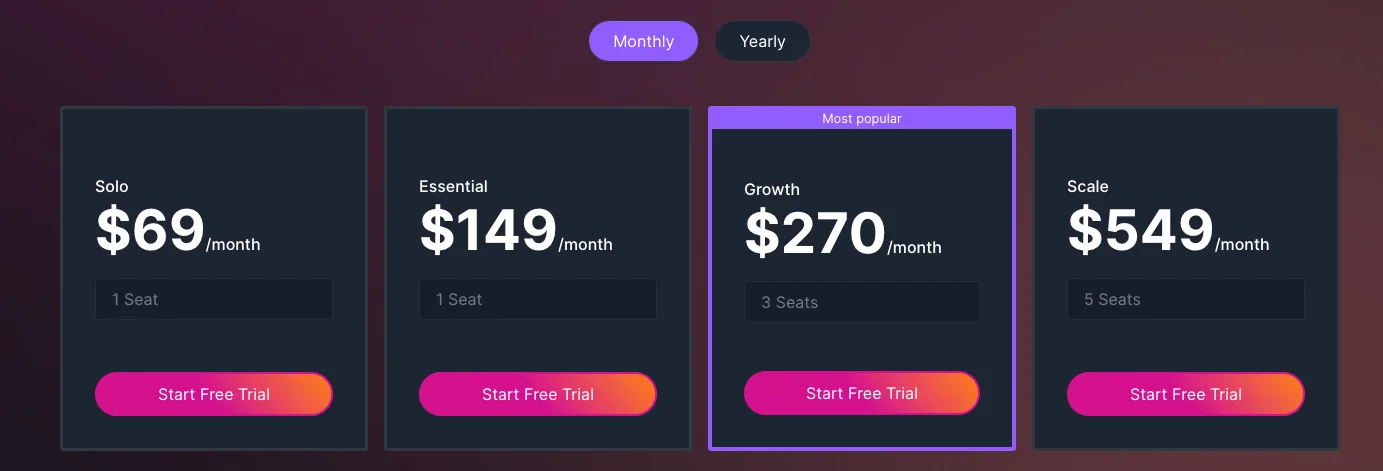
Besides the free trial, the paying plans start at $69/mo and go up based on your needs and the number of seats you need:
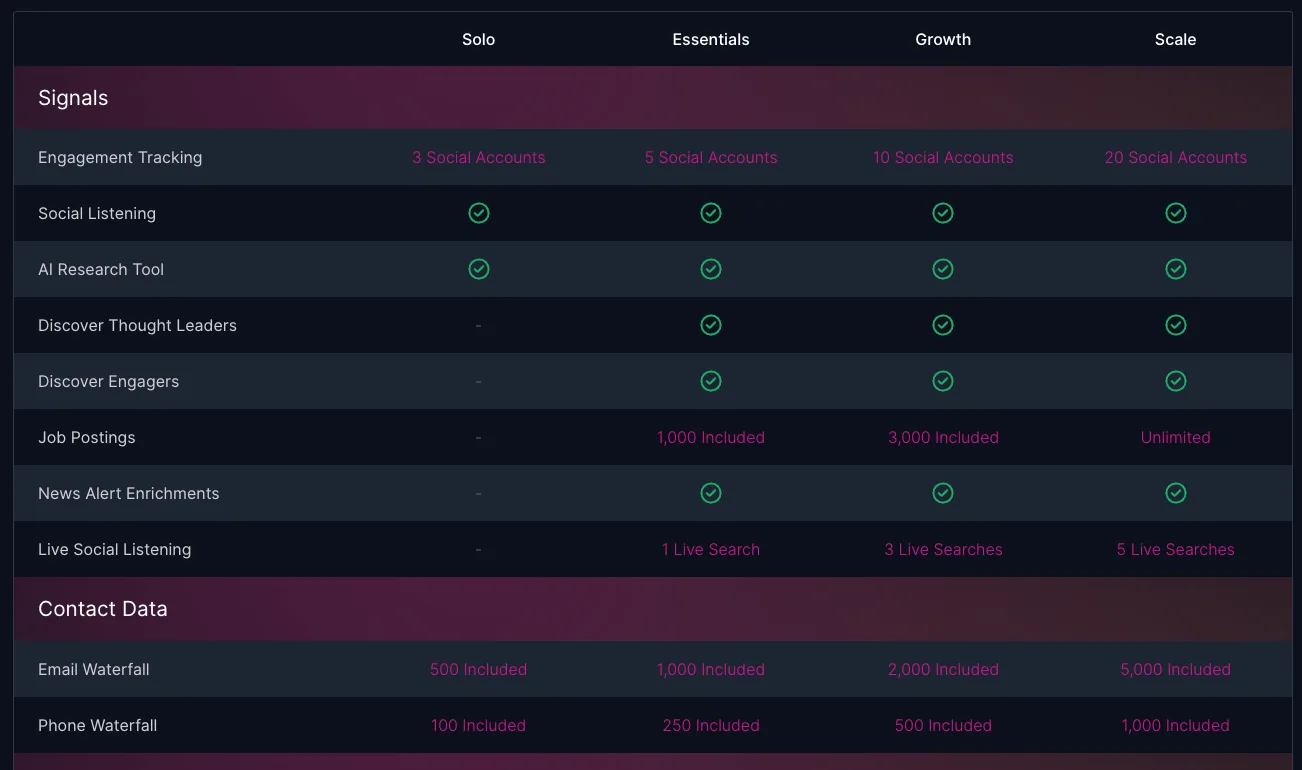
Here’s the plan comparison:
Trigify - The Bottom Line
As you can see, Trigify is a platform that gives you real-time, intent-based data on your prospects (and potential leads) and their activity on LinkedIn.
You can use this data to craft hyper relevant outreach messages. We believe in quality over quantity, which is why our campaigns can generate 20-30% response rates when we source new leads with Trigify.
Start a free Trigify trial right now.
Clay.com - Best PhantomBuster Alternative for Data Enrichment and Personalized Outreach
The entire sales industry is buzzing about Clay right now. So, what is it?
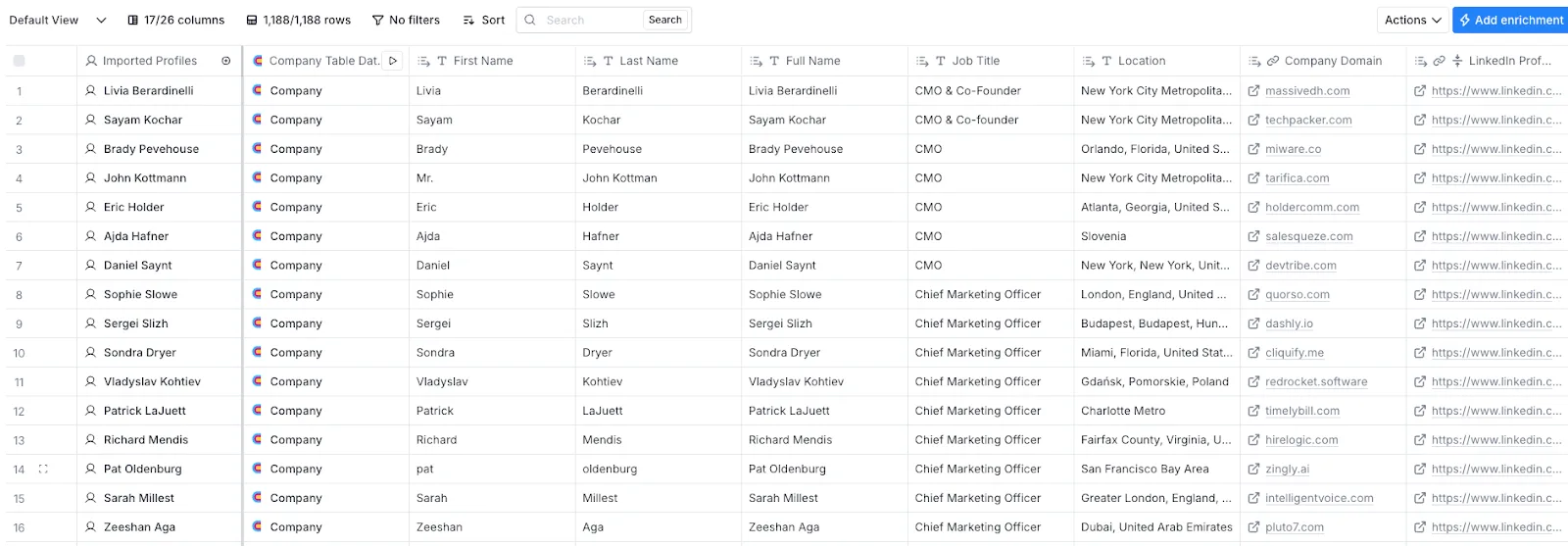
Clay is a tool that helps sales and marketing teams find and enrich lead data.
It combines information from hundreds of sources to provide accurate contact details and company/prospect insights.
With Clay, you can automate personalized outreach, making your campaigns more effective. It also integrates with your existing CRM and email systems, streamlining your workflow.
Pros of using Clay as your PhantomBuster alternative
- Comprehensive Data Enrichment - Clay aggregates information from multiple databases to provide detailed lead profiles. You can connect different platforms, use lead finder tools, and use contact finder tools to quickly run various prospect searches.
- AI-Powered Research - Clay uses AI to identify decision-makers and relevant data points.
- Personalized Messaging - It’s also easy to create personalized emails (or Icebreakers) according to the data you collect.
- Building complicated workflows - As already mentioned, Clay integrates with hundreds of tools, making it easy to create and run complex prospect searches and data collection.
- Getting data in minutes - Once you set up everything, you’ll get your lead data.
Clay.com Cons
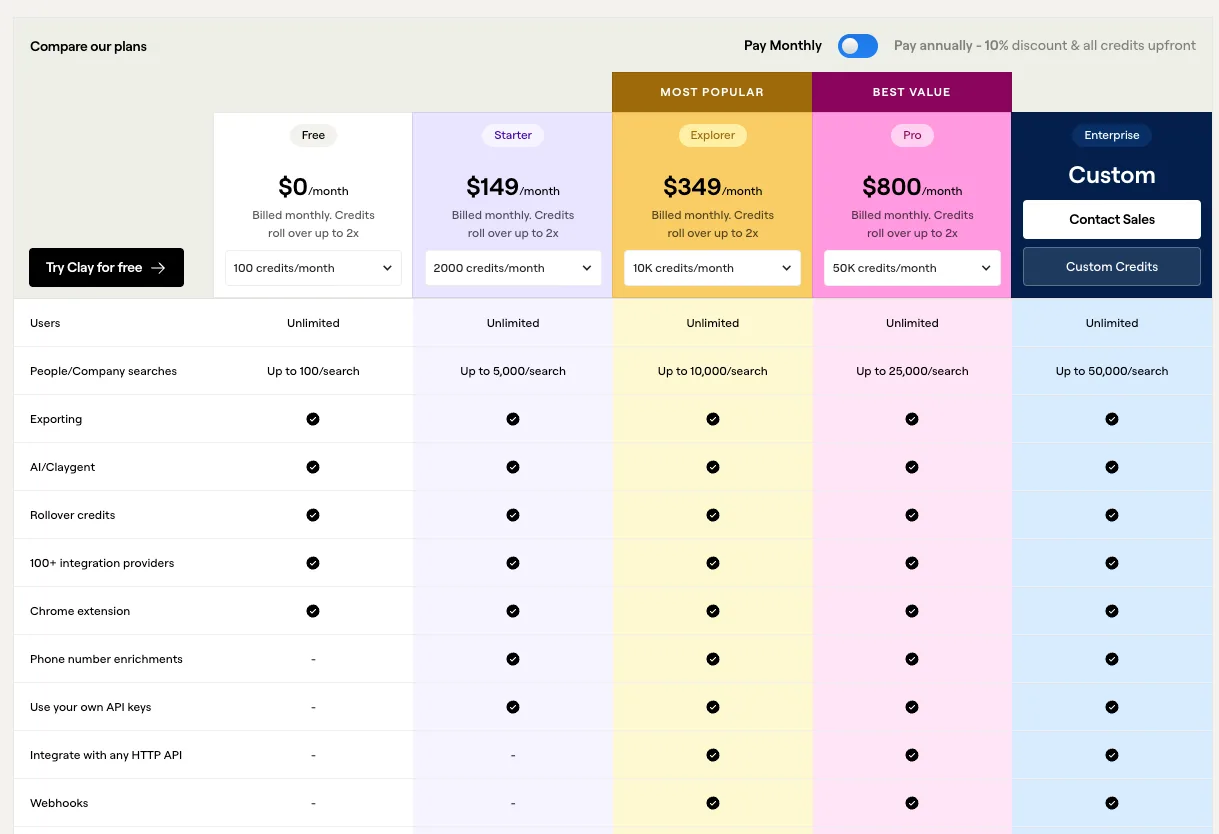
- Pricing - Clay is an expensive tool, starting at $149/mo for just 2000 monthly credits. If you’re looking to build advanced workflows, those 2000 credits will get you a database of around 500 or so people (with their emails). So if you need more prospects, expect to pay $350+/mo
- Complexity - You’ll need to invest a lot of time into learning how to use Clay (especially if you want to build more complicated workflows)
Clay.com Pricing
Clay.com operates on a credit-based system, with plans starting at $149 monthly for the Starter Plan, offering 5,000 company or people searches and 2,000 credits per month.
The Explorer plan starts at $350/mo and offers up to 10k monthly credits, while the Pro plan costs $800/mo.
Clay vs. PhantomBuster - The Final Thoughts
While PhantomBuster focuses on automating data extraction and interactions, Clay.com emphasizes enriching existing data and facilitating personalized outreach.
With Clay, you can build custom lead enrichment flows you need, all from the same place.
Let’s say that I first need a list of my ideal prospects in the USA. Then, I can build a flow that finds which one of those companies is hiring for specific roles. After that, I can get their emails and phone numbers from other data providers - and all from Clay directly.
This would be one of the simpler workflows. You could make them even more comprehensive (but that would require a lot of credits).
Clay might be a better alternative if you’re using PhantomBuster primarily for prospecting since it offers more possibilities without sacrificing your LinkedIn account. But that comes at a high monthly cost.
How do you get high-quality prospects with Clay for an outreach campaign with a 30%+ response rate?
Here’s a quick tip on using Clay to create a list of prospects who already showed a high interest in your product or service.
Instead of just finding all the people who fit specific ICP criteria and hoping they’re interested in your service, let’s find real-time data and social signals that give you proof that they’re interested.
At the end of the day, it’s better to focus on someone who has already shown interest rather than someone who just fits your ICP bracket, right?
Let’s say you run a product marketing agency that works with SaaS companies.
We first need to use Trigify to identify people who engaged with specific posts from the industry’s influencers.
Here’s a post from Wes Bush that talks about the Product-Led Growth trends in 2025:

Over 100 people engaged. Perfect. Let’s reach out to those people.
When I open Trigify, I can now see who those people are:
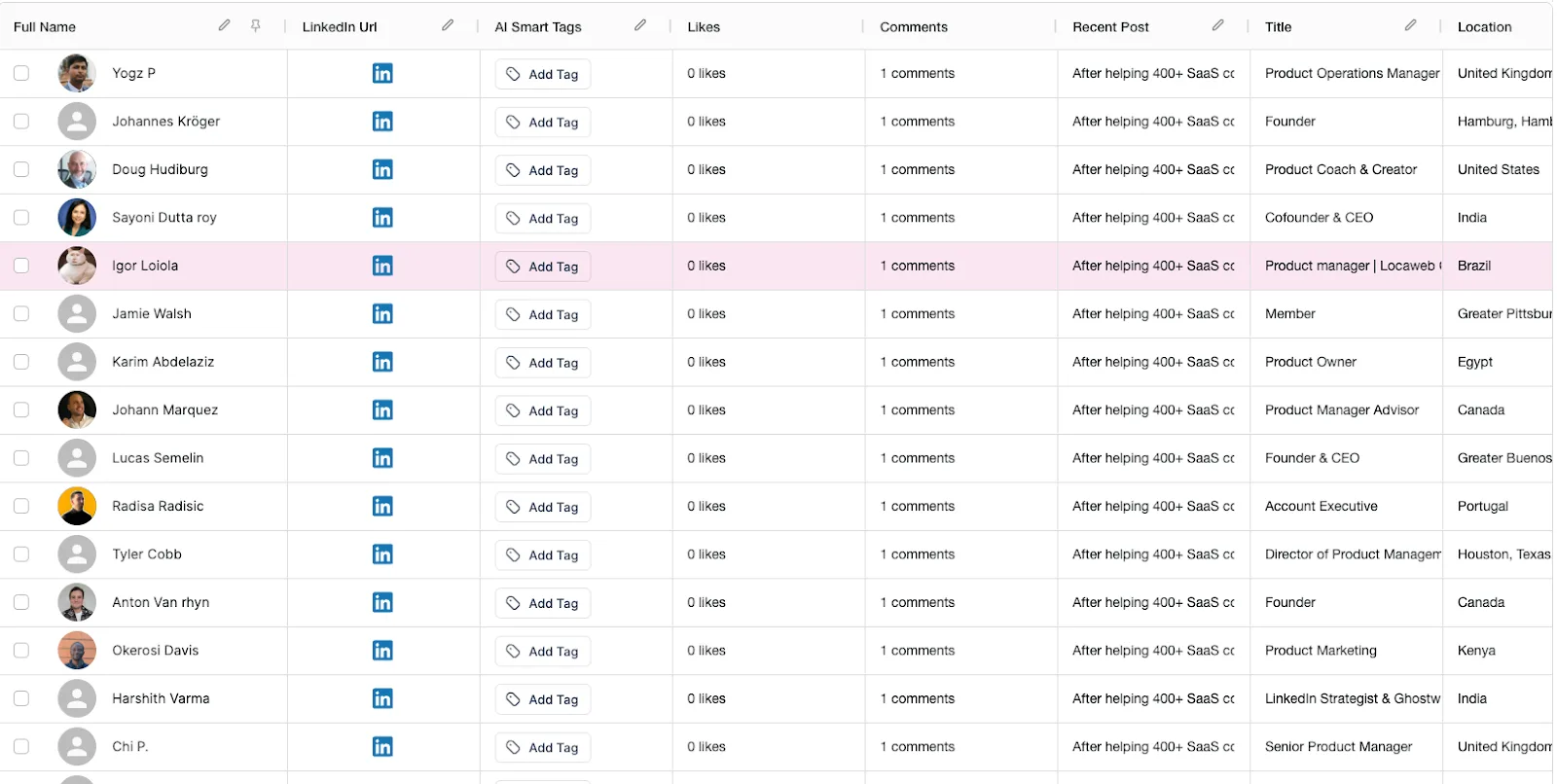
Select the leads that seem interesting and that fit your ICP, and export them directly into Clay:

All of these leads will be transferred to Clay. You can now build more sophisticated flows and find data (emails, phone numbers, addresses, specific information, etc) directly from Clay.
Once you find the additional data you need, export your list and import it into an outreach tool such as Instantly, SmartLead, or HeyReach, and you’re ready to go.
Octoparse.com - Best PhantomBuster Alternative for No-Code Web Scraping
Trigify and Clay are PhantomBuster alternatives that are more focused on B2B lead prospecting - and to be honest - so far, we haven’t found a better PhantomBuster competitor for that (especially if you’re getting your leads from LinkedIn - which you should if you’re a B2B company).
However, what’s the best PhantomBuster alternative if you need data from other places, such as Google or some other specific websites?
In this case, we found no better solution other than Octoparse.
Octoparse allows you to quickly, with no code, build custom scrapers and workflows - even for the websites that PhantomBuster doesn’t originally support.
Pros of using Octoparse as your PhantomBuster alternative
- User-Friendly Interface - No-code platform with a visual workflow designer, accessible to users without programming skills.
- Cloud-Based Extraction - Offers cloud services for running and scheduling scraping tasks efficiently. This avoids getting you banned from websites while scraping them.
- Versatile Data Export - Provides multiple data export formats and integration options.
- Opportunity to build whatever flow you want - With Octoparse, you can scrape almost every database on the web.
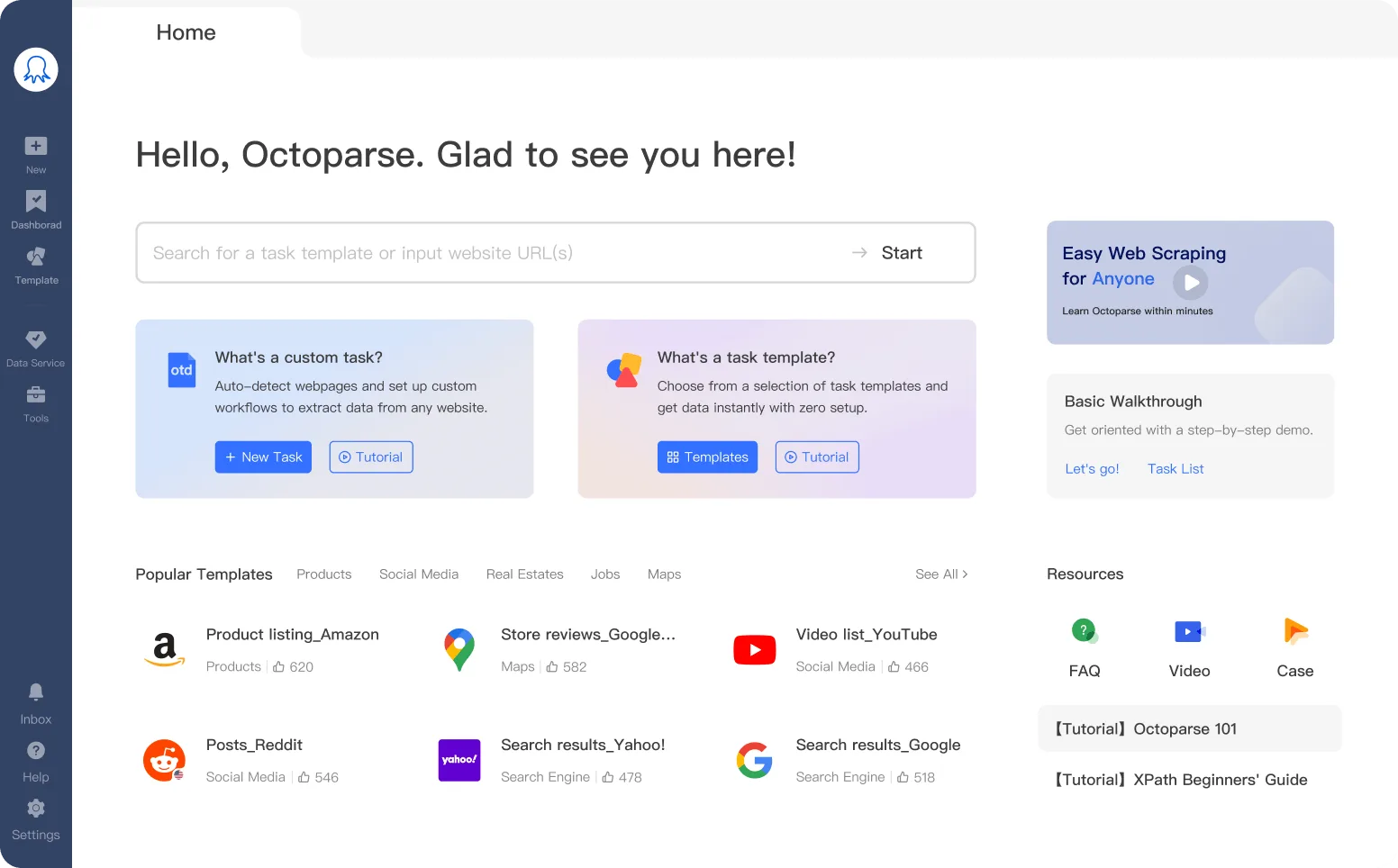
- Extensive library of predefined templates - The chances are that Octoparse already has a scraper for what you need (if not, you can easily create a custom one). There’s an extensive library of scrapers for whatever you can imagine. Scraping Reddit posts? Done. Scraping YouTube video commenters? Done.
Cons of using Octoparse
- Learning Curve - Despite being no code, some people might find it hard to build their own scraper (or even implement the existing one). You’ll need to go through a big trial-and-error process.
- Customer Support - Free users and low-tier customers might wait a long time for customer support to return to them.
- No contact data available - with PhantomBuster alternatives such as Trigify or PhantomBuster, you can find the leads’ contact information directly from the dashboard. However, if you use only Octoparse, you’ll also need to pay for third-party tools, such as Apollo, to get contact information.
Octoparse.com Pricing
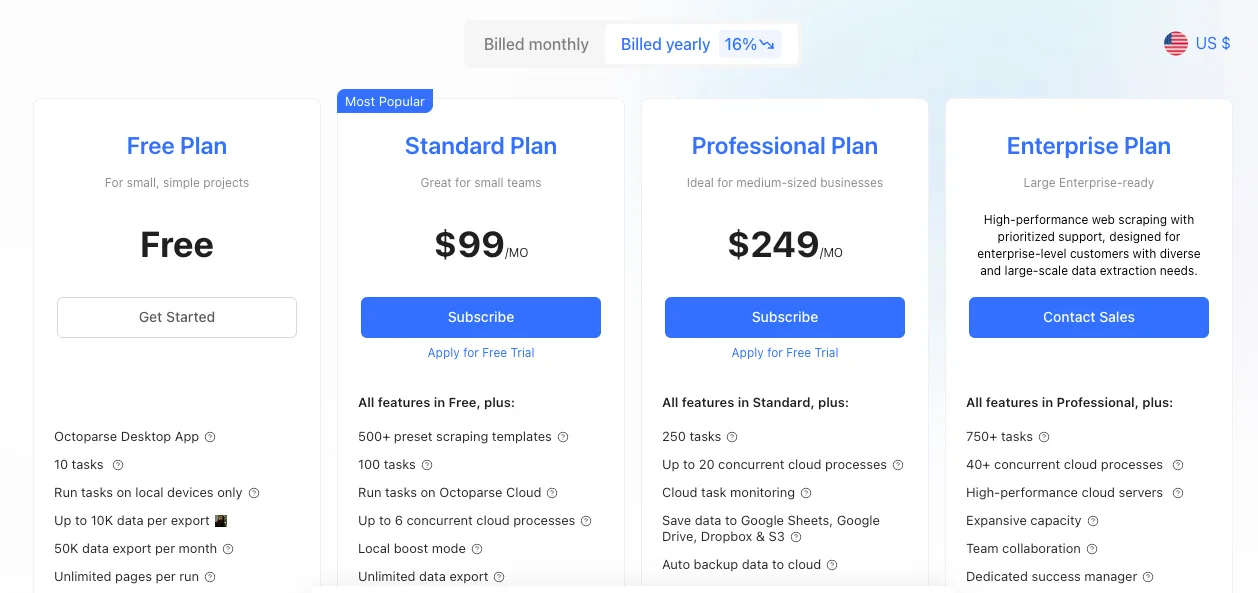
Octoparse offers a free plan with limited features, with paid plans starting at $89 per month for the Standard Plan, providing additional features and increased data extraction limits.
Octoparse vs. PhantomBuster
While PhantomBuster offers multi-platform automation, Octoparse specializes in no-code web scraping, making it more suitable for users focused on extracting data from various websites without coding.
Evaboot.com - Best PhantomBuster Competitor for LinkedIn Sales Navigator Scraping
If your entire prospecting and sales are based around LinkedIn Sales Navigator, then Evaboot might be your perfect PhantomBuster competitor.
Evaboot software lets you easily export LinkedIn Sales Navigator leads and find their email addresses.
That’s the only thing the product does.
Evaboot Pros
- Efficient Data Extraction - Easily extracts leads and account information from LinkedIn Sales Navigator, saving time and effort.
- Data Cleaning and Filtering - Automatically cleans and filters extracted data, ensuring accuracy and relevance.
- Email Finding and Verification - Identifies and verifies professional email addresses associated with leads, enhancing outreach effectiveness.
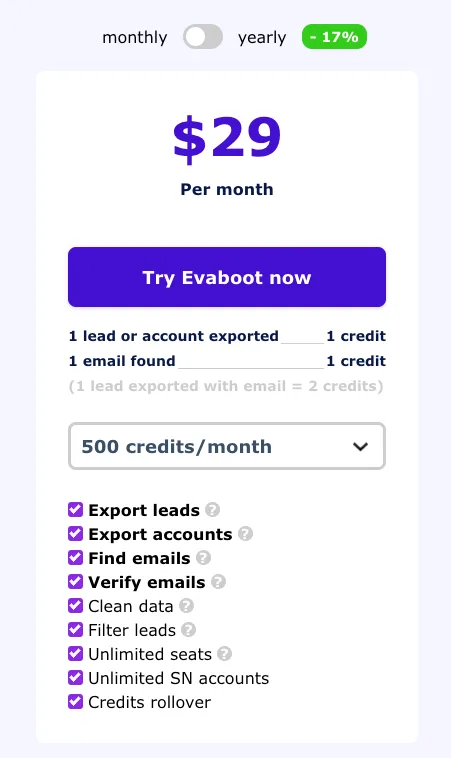
- It’s relatively cost-effective - Evaboot doesn’t break the bank. The smallest plan costs $9/mo for around 100 monthly leads. For $29/mo, you’ll get 500 leads.
Evaboot Cons
- Limited Scope: Focused solely on LinkedIn Sales Navigator, which may not suffice for people seeking multi-platform data extraction.
- Email Enrichment Limitations: Some users have reported that email enrichment features occasionally yield incomplete or incorrect results.
Evaboot Pricing
Evaboot offers a credit-based pricing model, with plans starting at $9 per month and go up based on how many credits you need.
Evaboot vs. PhantomBuster
While PhantomBuster provides automation across multiple platforms (and LinkedIn Sales Navigator), Evaboot specializes in LinkedIn Sales Navigator only, offering a more streamlined and user-friendly experience for that particular use case.
So, if you’re using PhantomBuster just for the scrape of scraping Sales Navigator lists, then Evaboot is a good choice for you since it does it slightly better but for a fraction of the cost.
PhantomBuster Alternatives & Competitors - The Final Comparison
So, which PhantomBuster alternative is the best for you?
Choose:
- Clay.com - if you need advanced data enrichment workflows, don’t mind paying $350+/mo.
- Octoparse - If you need a customizable, no-code scraping solution
- Evaboot - perfect for LinkedIn Sales Navigator scraping, providing specialized tools for extracting and cleaning LinkedIn data.
- Trigify - Best for signal-based lead generation, leveraging LinkedIn engagements and social signals to identify intent & find leads who are interested in buying your product/service right now.
If you want your campaigns to have a 30%+ response rate, you need to reach out to the prospects who showed at least some intent or might (according to multiple factors) be interested in your product.
The best way to find those is to use social signals and Trigify's data. Start your free Trigify trial today.