GTM Engineer Playbook: Social Signals to Pipeline | Trigify
How GTM engineers turn person-level social signals into pipeline using Trigify CLI and MCP alongside Clay, Default, Unify, and CRM stacks.

This playbook is a chapter of the parent guide: Social Media Signals for GTM: The Complete Guide.
TL;DR
- A GTM engineer turns signals into production workflows: detect the event, enrich the actor, score fit and timing, then route the next action.
- The clean stack has three contracts: Trigify detects, enrichment tools add context, and CRM or outbound tools activate.
- Do not start with a giant list. Start with one signal definition, one routing rule, and one conversion metric.
- The strongest workflows combine multiple signals, such as job change plus topic engagement plus ICP fit.
What is a GTM engineer?
A GTM engineer is a technical operator inside a revenue org who treats go-to-market like software: they define signals, write workflows, version them, ship them, measure conversion, and deprecate what does not work. The role was formalised through 2023 and 2024 by Clay's Kareem Amin, Varun Anand, and Everett Berry, with Clay University becoming its de facto training ground.
Day-to-day, a GTM engineer owns the CRM data model, composes enrichment waterfalls, writes LLM qualification columns, and wires signals into sequencers. The mindset is product engineering applied to pipeline. Every table is a product with an owner, a schema, and a deprecation policy. Every workflow has an ID you can grep for in Salesforce six weeks after it shipped.
Why do GTM engineers need social signals?
GTM engineers need social signals because company-level intent data cannot tell you which person at an account is researching, what specific sub-topic they are leaning into, or when the behaviour spiked relative to a role change. Person-level public social behaviour answers all three, turning anonymous buying-committee noise into named humans inside a defined window.
The macro arrow points the same direction from every angle. Forrester ranks signal-based GTM the number one emerging trend for B2B sales and marketing in 2026. The LinkedIn State of Sales 2024 report found 78% of social sellers outsell peers who do not use social. The Ehrenberg-Bass Institute's 95/5 rule reminds us only 5% of buyers are in-market at any given time, so earlier detection is compounding leverage. MarketsandMarkets projects the intent data category will reach $5.2B by 2027 at a 25% CAGR.
Company-level intent can tell you someone at Acme is researching observability. Person-level social behaviour tells you the newly hired VP of Engineering commented on a competitor's post about OpenTelemetry, two weeks into her role, at a 300-person SaaS that just opened three SRE reqs. That is a buying window, not a theme.
What does the GTM engineer stack look like?
The GTM engineer stack has three layers with contracts between them: detect, enrich, and activate. Treating each layer as a swappable service, rather than one monolithic tool, is what lets the stack survive vendor churn. You should be able to replace any single component without rewriting the other two.
- Detect (upstream). Trigify for person-level social behaviour across professional networks, Reddit, X, Substack, YouTube, and Hacker News. Common Room for owned community. RB2B for anonymous site visitor deanonymisation. UserGems for job changes. Pocus for product signals.
- Enrich (middle). Clay is the default orchestration and enrichment table. Default and Unify are strong alternatives. This is where waterfalls resolve emails, firmographics, and LLM qualification columns.
- Activate (downstream). HubSpot or Salesforce as system of record. Outreach, Apollo, or Smartlead for sequences. Slack for alerts. MCP-exposed agents for drafting and routing.
Trigify deliberately sits at the detect layer. We do not try to replace Clay. We feed it.
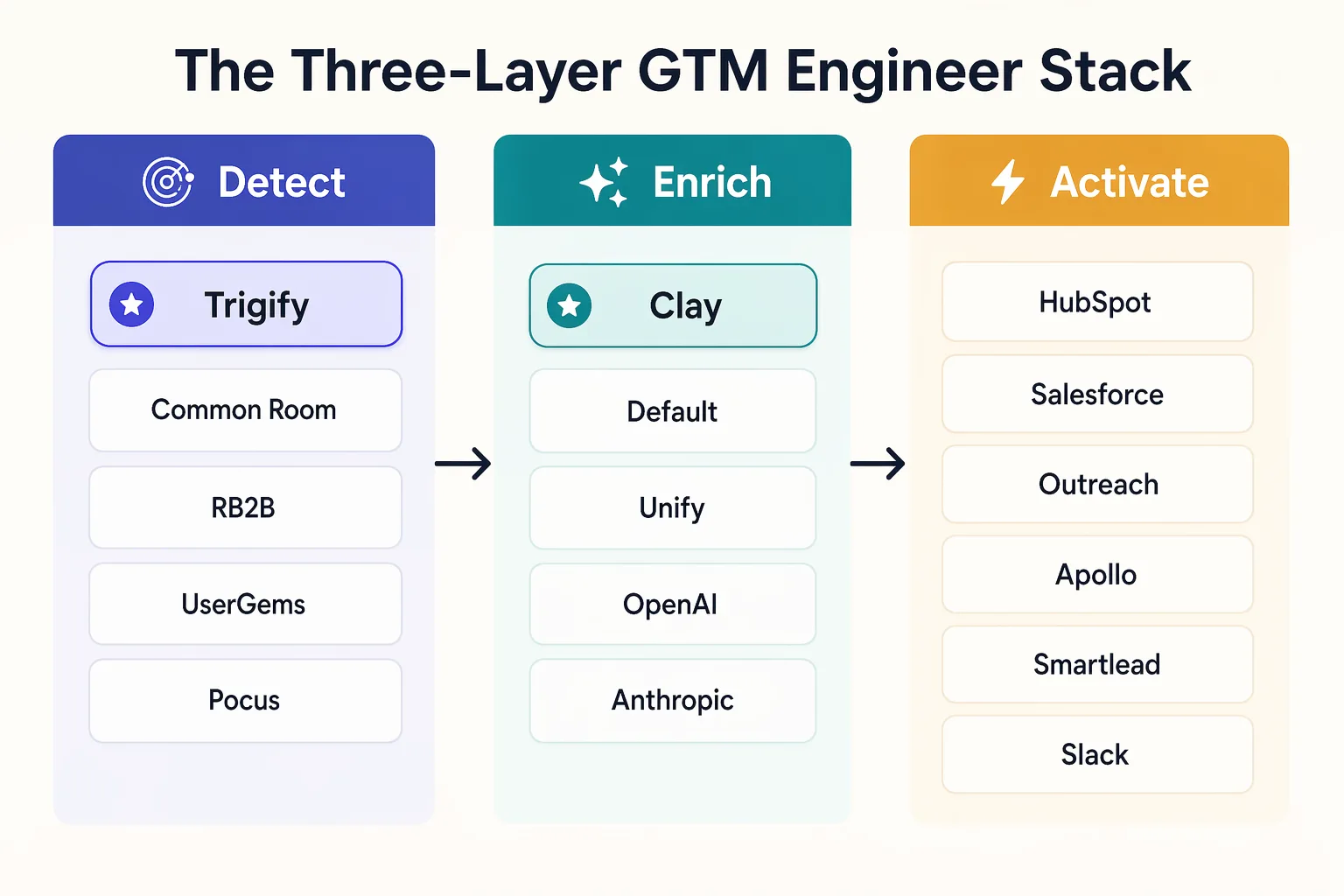
The Three-Layer GTM Engineer Stack
How do you define a signal programmatically?
A signal is defined as a versioned spec, not a GUI click. The spec declares the platform, entity type, topic or keyword filters, account or ICP filters, and a threshold. Writing it as YAML (or JSON) makes the signal reviewable in pull requests, testable in CI, and reproducible across environments. Point-and-click workflows cannot survive a GTM engineer hire's first quarter.
# trigger-spec.yml
name: competitor_engagement_target_accounts
platform: professional_network
entity: person
filters:
  accounts: from_crm('tier_1_accounts')
  engaged_with:
    authors: ['@competitor_ceo', '@competitor_vp_product']
    action_types: [like, comment, repost]
  window_days: 14
threshold: 1
The lens sits on top of the trigger. LLM columns in Clay are the common shape, but Trigify chains its own workflow engine first so you only pay to enrich the signals that pass qualification:
$ trigify workflows run competitor_engagement_target_accounts \
    --classifier "is_technical_buyer AND topic_match='observability'" \
    --output webhook:https://clay.com/hooks/tbl_xyz
Every signal ends at a destination contract. CRM field, sequencer action, Slack channel, or an MCP tool call from an agent. Trigify exposes an MCP server so Claude, ChatGPT, or a custom agent can query signals as first-class tools:
// agent tool call via MCP
await tools.trigify.search_signals({
  workflow: "competitor_engagement_target_accounts",
  since: "2026-04-15",
  limit: 50
});
For the full CLI surface, see Introducing the Trigify CLI.
What are composite signals?
Composite signals are logical AND combinations of two or three primitive signals that must fire inside a time window. They convert better than single-signal triggers because each primitive filters out a different class of false positive. UserGems' own data shows job changers are 3x more likely to buy in their first 90 days, and stacking that primitive with topic engagement produces a defined buying window.
# composite.py (pseudo-orchestration)
from trigify import signals
from clay import enrich

buying_window = signals.all_of([
    signals.job_change(role_contains=["VP Eng", "Head of Platform"], within_days=90),
    signals.topic_engagement(topics=["observability", "otel"], within_days=30),
    signals.account_in_list("icp_tier_1"),
])

for person in buying_window.stream():
    record = enrich.waterfall(person, providers=["clay_default"])
    if record.email and record.company.size > 200:
        outreach.task(record, template="warm_topic_opener", owner=record.ae)
Notice the separation of concerns. Trigify detects, Clay enriches, Outreach activates. Each layer is swappable. A composite signal is a product, not a script.
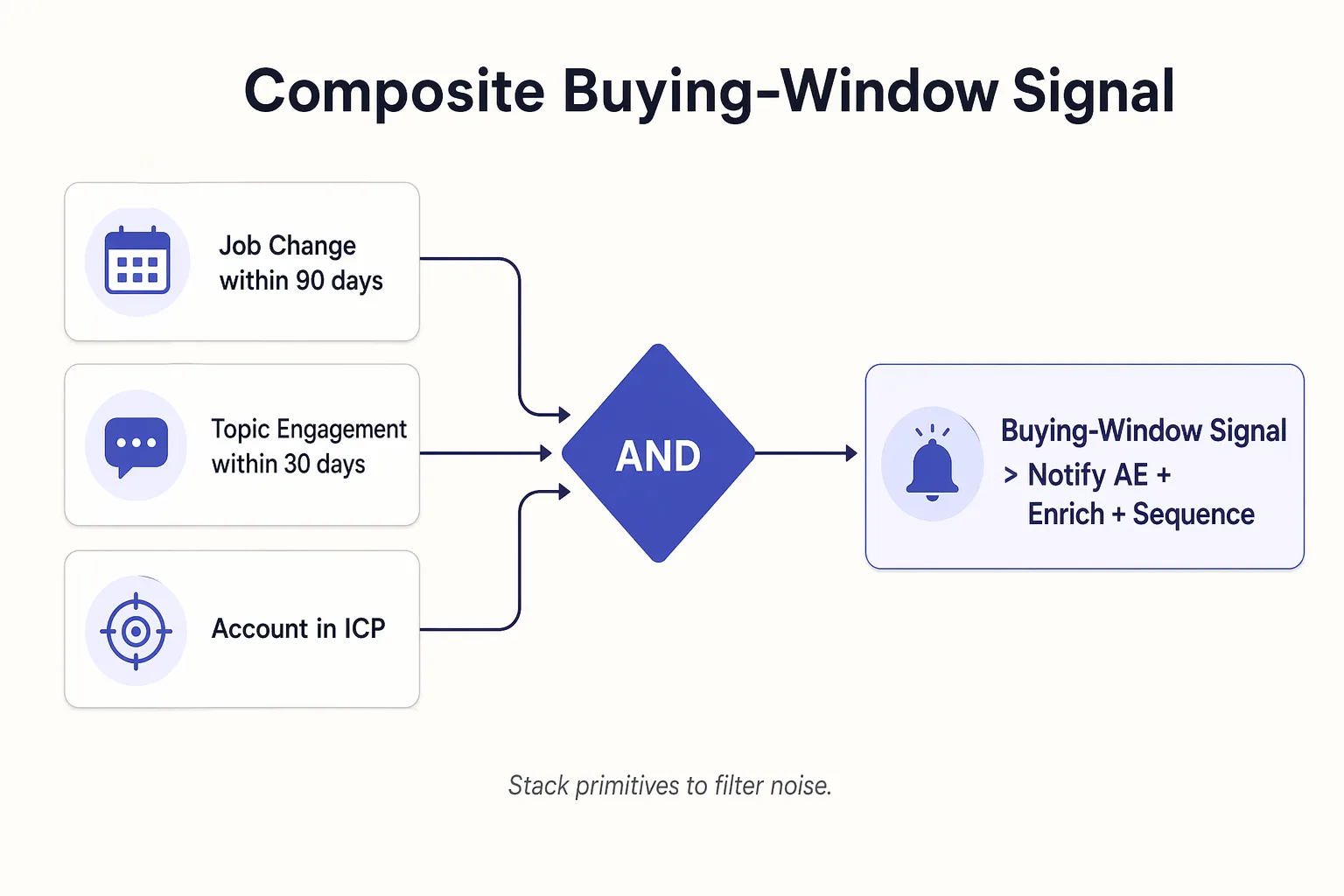
Composite Buying-Window Signal
How do you measure signal performance?
Signal performance is measured with per-workflow conversion tracking and closed-loop attribution back into CRM. Every record written to HubSpot or Salesforce carries signal_source, workflow_id, signal_timestamp, and signal_payload_url, so a Hex or Looker dashboard can read pipeline and revenue by workflow. If a workflow cannot be attributed, it cannot be defended at the quarterly review.
- Report signal-to-meeting and signal-to-opportunity rates per workflow_id. TrustRadius found 87% of B2B buyers want a self-directed experience, which means the winning signals are the ones that earn a reply without a pushy cadence.
- Benchmark every new workflow against cold outbound for the same segment. Anything that does not beat cold for two consecutive months gets deprecated.
- Treat workflow retirement as a feature, not a failure. Shipping and killing signals is the job.
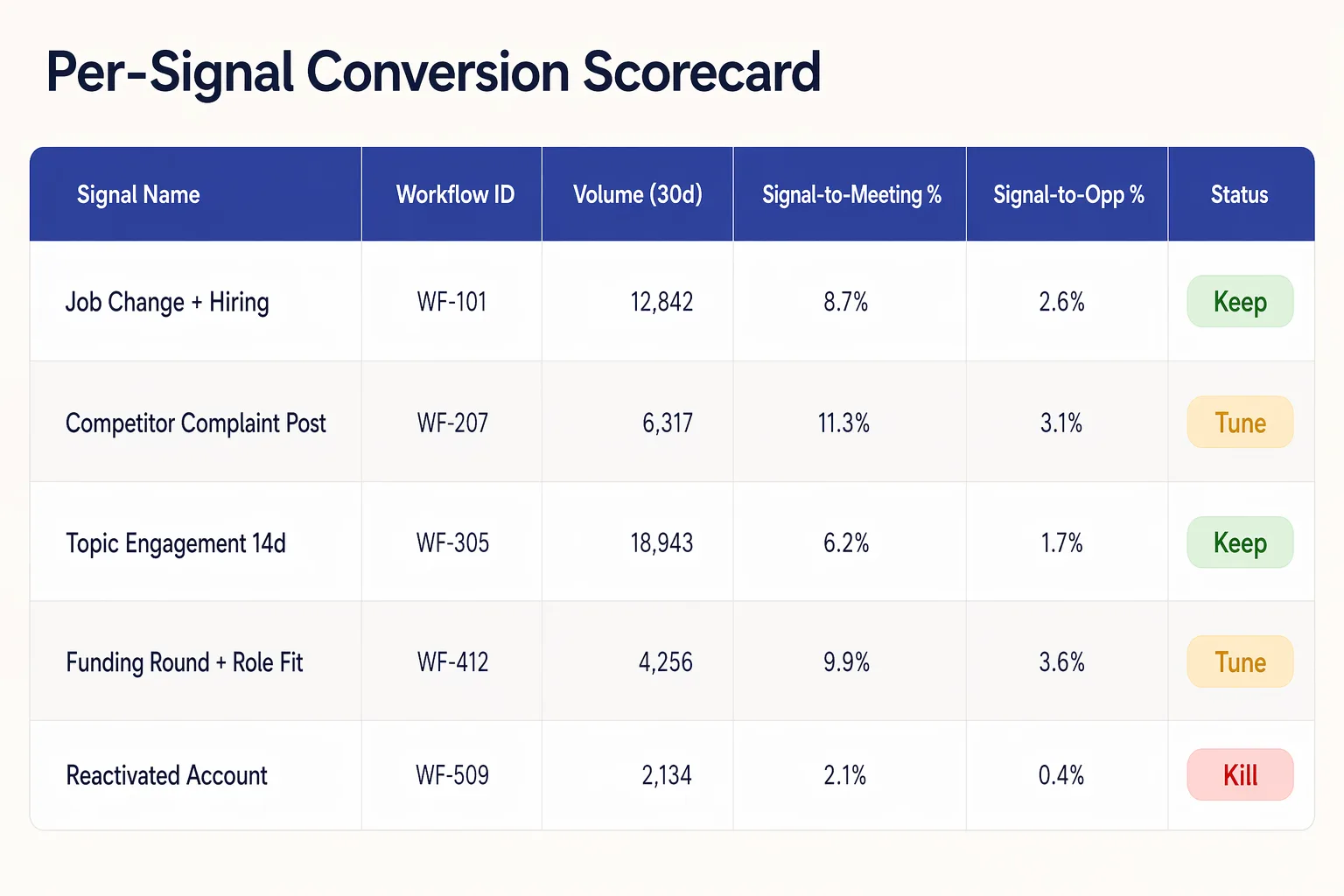
Per-Signal Conversion Scorecard
Where does Trigify fit in the stack?
Trigify sits upstream of Clay as the person-level social signal primitive. It covers six platforms (professional networks, Reddit, X, Substack, YouTube, Hacker News), exposes a CLI and an MCP server, and ships with a custom workflow engine so signals can be classified before they hit your enrichment credits. Clay, Default, and Unify remain best-in-class for enrichment and activation.
Trigify
- Layer: Detect
- Strength: Person-level social signals across 6 public platforms
- Interface: CLI, MCP, webhooks
Common Room
- Layer: Detect
- Strength: Owned community (Slack, Discord, GitHub)
- Interface: GUI, API
RB2B
- Layer: Detect
- Strength: Anonymous US site visitor deanonymisation
- Interface: GUI, webhooks
UserGems
- Layer: Detect
- Strength: Job change tracking across CRM contacts
- Interface: CRM-native
Clay
- Layer: Enrich
- Strength: Orchestration, waterfall enrichment, LLM columns
- Interface: GUI, API
Default / Unify
- Layer: Enrich + Activate
- Strength: Warm outbound orchestration
- Interface: GUI, API
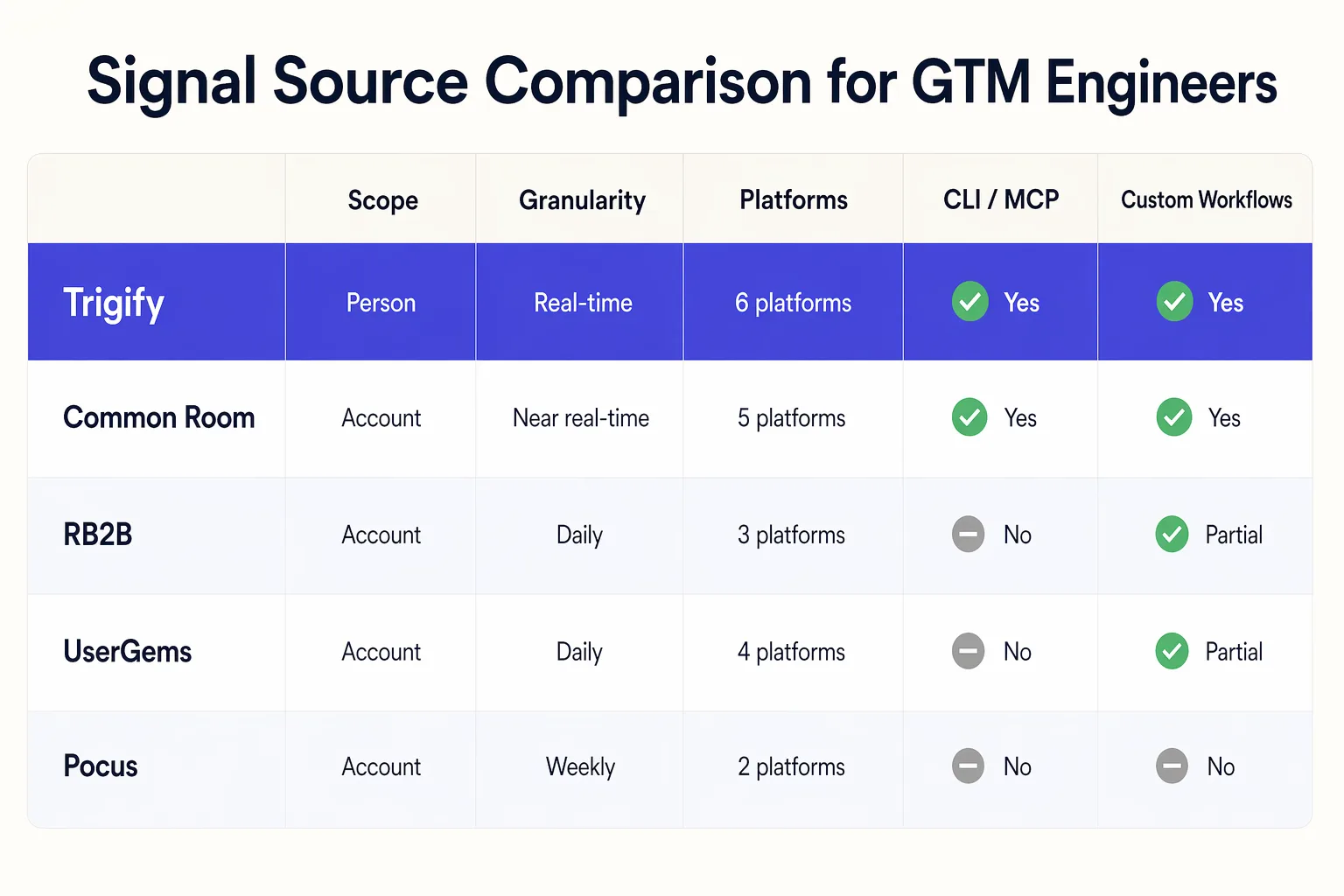
Signal Source Comparison for GTM Engineers
Example workflow: social signal to Clay to sequencer
A concrete end-to-end a GTM engineer can ship in an afternoon. Six steps, roughly 40 lines of YAML plus one Clay table, fully attributed back into CRM.
- Trigger. Trigify watches tier-1 accounts for any person engaging with three named competitor authors on topic "vector databases".
- Detection. Trigify fires a webhook payload containing person profile URL, post context, and engagement type.
- Enrichment. Webhook lands in a Clay table. Waterfall adds work email, role seniority, and company tech stack. An LLM column drafts a two-sentence personalised opener referencing the post.
- Routing. Clay pushes to HubSpot, sets
signal_source=trigifyandworkflow_id=ve_ca_t1, assigns to the account AE, and enrols in a Smartlead sequence with the LLM opener as step one. - Alerting. Slack
#signals-tier1gets a structured card so the AE can intercept and personalise further. - Attribution. Weekly Hex dashboard reads CRM by
workflow_idand reports meetings and pipeline.
FAQ: GTM Engineering with Social Signals
What does a GTM engineer do?
A GTM engineer defines, ships, and measures the systems that turn signals into pipeline. They own the CRM data model, compose enrichment waterfalls, write LLM qualification columns, wire signals into sequencers, and instrument every workflow with conversion attribution. The role blends RevOps, software engineering, and applied AI into one technical seat inside a revenue org.
How is a GTM engineer different from RevOps?
RevOps owns process, reporting, and tooling administration across revenue teams. A GTM engineer owns buildable systems: signal workflows, enrichment pipelines, AI agents, and the CRM data model that supports them. RevOps is closer to business operations, GTM engineering is closer to product engineering. In larger orgs the two functions sit side by side and collaborate on the CRM schema.
What tools belong in a GTM engineering stack?
The canonical stack splits into detect, enrich, and activate. Detect: Trigify, Common Room, RB2B, UserGems, Pocus. Enrich: Clay, Default, Unify, plus LLM APIs for qualification columns. Activate: HubSpot or Salesforce, Outreach, Apollo, Smartlead, and Slack. Infrastructure often includes n8n, webhooks, Postgres or BigQuery, and Hex for dashboards.
What is a composite signal?
A composite signal is a logical AND combination of two or more primitive signals that must fire inside a defined time window. For example, job change within 90 days plus topic engagement within 30 days plus ICP account membership. Composite signals convert better than single triggers because each primitive filters out a different class of false positive.
Can AI agents call Trigify directly?
Yes. Trigify exposes an MCP server so any MCP-aware agent (Claude, ChatGPT, custom LangGraph agents) can query workflows and signals as first-class tools. This matters because LLM agents increasingly do the drafting and routing work GTM engineers used to handwire. See Introducing the Trigify CLI for CLI plus MCP details.
How do you measure signal-to-meeting conversion?
Write signal_source, workflow_id, signal_timestamp, and signal_payload_url on every CRM record at signal time. Build a dashboard in Hex or Looker that joins meetings booked and opportunities created back to those fields. Compare each workflow's conversion against cold outbound baseline for the same segment and deprecate underperformers after two months.
What is the fastest way for a GTM engineer to start with Trigify?
Install the CLI, define one trigger spec for a single tier-1 account list plus a competitor author list, point the webhook at a new Clay table, and wire Clay to HubSpot with signal_source=trigify. That is an afternoon of work and produces enough signal within two weeks to validate the pattern before you scale to composite buying-window logic.
Does Trigify replace Clay?
No. Trigify sits upstream of Clay as the detection layer. Clay remains the orchestration and enrichment surface. A typical stack looks like Trigify detects a person-level social signal, the webhook lands in a Clay table, Clay waterfalls enrichment and LLM columns, then syncs to HubSpot or Salesforce. The two tools compose, they do not compete.
- Social Media Signals for GTM: The Complete Guide. Start here if you want the full strategy, not just the engineering slice.
- Social Media Signals for Marketing. If you own demand gen and need to feed better signals into campaigns and ABM.
- Social Media Signals for Sales. If you run a sales team and want the rep-level playbook.
- Social Signals vs Intent Data. If you are deciding whether social signals replace or complement your existing intent stack.
- Introducing the Trigify CLI. If you want the full CLI and MCP surface to start building today.
Thought leaders worth following as you build: Everett Berry and Kareem Amin at Clay, Boris Revechkis on agent orchestration, Linda Lian at Common Room, Austin Hughes at Unify, and Adam Robinson at RB2B.